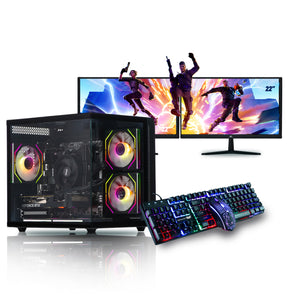
How to Pick the Right Prebuilt Gaming Package for Your Needs
For many gamers, the dream of owning a powerful gaming computer often comes with one big question: should you build a custom PC or buy a prebuilt gaming package? While building your own rig can be fun and customizable, prebuilt systems have gained popularity because they save time, reduce stress, and often come as part of a full PC gaming setup.
But with so many options on the market, how do you choose the right prebuilt gaming package for your needs? This guide breaks it down step by step, helping you make an informed decision without overspending.
What Is a Prebuilt Gaming Package?
A prebuilt gaming package is essentially a ready-to-use PC bundle designed specifically for gamers. It usually includes:
- A fully assembled gaming PC with installed operating system
- Essential PC components
- Peripherals like keyboard, mouse, and sometimes headset
- Optional extras such as a gaming monitor or speakers
In other words, it’s a full PC gaming setup that eliminates the hassle of sourcing and assembling parts individually.
Why Choose a Prebuilt Gaming Package?
Here are some key reasons many gamers prefer prebuilt systems:
- Convenience – No need to assemble or troubleshoot; just plug and play.
- Warranty & Support – Prebuilts usually come with warranties covering the whole system.
- Time-Saving – You can start gaming immediately instead of waiting to source and build parts.
- Bundled Value – Many packages include a monitor, mouse, and keyboard, saving extra costs.
Step 1: Define Your Gaming Goals
Not every prebuilt gaming package is created equal. Your ideal choice depends on how you plan to use it:
- Casual Gamer – Mostly esports titles like CS2, Valorant, Fortnite → Entry-level package.
- AAA Gamer – Games like Cyberpunk 2077, Elden Ring, Starfield → Mid-range package.
- Content Creator + Gamer – Streaming, editing, and gaming → High-end package with extra power.
- Future-Proof Enthusiast – Wants 4K, ray tracing, VR → Top-tier RTX prebuilt package.
Step 2: Evaluate the Core Components
When choosing a prebuilt gaming package, always check the specifications of the core components.
1. CPU
- Entry-Level: Intel i5 or AMD Ryzen 5 – Great for esports and 1080p gaming.
- Mid-Range: Intel i7 or Ryzen 7 – Balanced choice for AAA titles.
- High-End: Intel i9 or Ryzen 9 – Best for multitasking, 4K gaming, and heavy workloads.
2. GPU
The GPU is the most critical part of a full PC gaming setup.
- Entry-Level: NVIDIA GTX 1660 Super or RTX 3050 – Handles 1080p gaming.
- Mid-Range: NVIDIA RTX 3060 Ti or RTX 3070 – Great for 1440p at high settings.
- High-End: RTX 4080 or RTX 4090 – Designed for 4K, VR, and ray tracing.
3. RAM
- Minimum 16GB DDR4 for gaming.
- For streaming/content creation, 32GB DDR5 is ideal.
4. Storage
- SSD: At least 500GB for fast game load times.
- HDD: For extra storage of large files.
5. Power Supply
Ensure the PSU has enough wattage (500–850W depending on GPU) and is 80+ certified for efficiency.
Step 3: Consider the Included Peripherals
A prebuilt gaming package often includes more than just the tower. Check if the bundle provides:
- Monitor – A 1080p 144Hz monitor is perfect for budget setups, while 1440p/4K monitors suit higher-end rigs.
- Keyboard – Mechanical keyboards offer durability and faster response times.
- Mouse – Look for a gaming mouse with adjustable DPI settings.
- Headset – Some bundles include budget headsets for voice chat and immersive sound.
Step 4: Match the Package to Your Budget
Budget is one of the most important factors. Here’s a breakdown:
- Budget Prebuilt Gaming Package ($700–$1,000)
- Great for esports and light AAA titles.
- Includes entry-level GPU and 16GB RAM.
- Often comes with basic peripherals.
- Great for esports and light AAA titles.
- Mid-Range Package ($1,200–$1,800)
- Can handle modern AAA games at 1440p high settings.
- GPU like RTX 3070 or RTX 4070.
- May include a higher refresh rate monitor.
- Can handle modern AAA games at 1440p high settings.
- High-End Package ($2,000–$3,500+)
- Designed for 4K, VR, and streaming.
- Features RTX 4080/4090 with 32GB RAM.
- Includes premium peripherals for a professional full PC gaming setup.
- Designed for 4K, VR, and streaming.
Step 5: Check Warranty and Support
A major advantage of buying a prebuilt gaming package is warranty coverage. Look for:
- System-wide warranty (1–3 years).
- Customer support for troubleshooting.
- Easy replacement policies for defective parts.
Step 6: Look for Upgrade Potential
Even if you’re buying a prebuilt system, future-proofing is important. Check whether:
- The case has room for additional drives/fans.
- The motherboard supports future CPU and RAM upgrades.
- The PSU has enough headroom for a stronger GPU later.
A good prebuilt gaming package should allow you to upgrade over time instead of replacing the entire system.
Conclusion
Choosing the right prebuilt gaming package comes down to balancing your budget, performance needs, and upgrade potential. If you’re a casual gamer, an entry-level package will serve you well. For competitive gaming or AAA titles, a mid-range option is perfect. And if you want to go all out with 4K gaming or streaming, high-end packages offer unbeatable performance.
The beauty of a full PC gaming setup in package form is convenience everything you need in one purchase, backed by warranty and support. With the steps outlined above, you can confidently pick the best prebuilt gaming package tailored to your needs and start gaming without the stress of building from scratch.
Keep an eye for more latest news & updates on Utd Plug!